For a while now, I've been visiting the site known as Machinima.com. A site dedicated to user-created machinima.
But, I had a bone to pick with them, so I reported an "issue" I had with the site, the original message is shown below:
So many bugs with Machinima.com
----------------------
Before I start I'll state I'm using Firefox 2.0. With that being said
1) I've noticed that when I go to download a video from machinima.com, it will download. But when I go to download another video, the video will not load nor will the download link work. The only way I can get it to come back is to close Firefox and re-enter the site.
2) The Maximize button on the videos does not... Well, maximize! Just sits there and deceives!
3) I've experienced extremely slow page loading times. Videos load just fine, it's the pages that are taking too long.
4) The Search is useless. If I try searching for a new video with a general name like "Infection" using that Google-based search box, I'll get videos that I did not want. Can't you guys code your own search so that you can choose to search by Title, Author, Description, etc?
5) Site is messy, it's too hard to keep up with everything going around. It may just be me, but I think a clean-up is due.
6) Can we please choose to view all videos from a director? Sure, there's the "More From This Director", but why would you make clicking a author's name take you to the forums when I'm sure 90% of the time a user is trying to view more of their videos.
Anyways, these are things that have been bugging me about machinima.com, although the site is amazing, the performance is below what I would expect from an amazing community.
Thanks!
-NessDan
----------------------
I hope they attend to these suggestions/issues soon, they've been a peeve ever since I've noticed them.
Tuesday, April 1, 2008

Wednesday, February 13, 2008
Xbox Open Heart Surgery
Well, today was truly a successful day!
To fill you in before you read any further, please skim through this topic I had posted on Xbox-Scene.
Done? Then let's begin.
Mike Cook was on my bus today, that's basically a way of saying he's coming over (which I do enjoy!) He had known about my problem and he even tried getting started with me a while back, but we didn't have the right screws =(
Lucky for me, he pulled out his shiny screws, hundreds, even thousands*! He had brought that and his handy-dandy; Screwdriver!
*More like 40 screws total.
When we came home, we got straight to work. We spent time unscrewing the Xbox and once it was fully done, we peeked around inside. There was a Western Digital HDD and the CD/DVD drive that was inside of it, so after discussing why that drive wasn't unusually large, we got to work on opening up our computer (if you don't know what we're doing right now, go back and read the forum topic again and click the link that takes you to the Hotswapping FAQ, just read the first question in there and you'll be up-to-date.)
Now, after the first attempt, we booted our Xbox, got the error message, then swapped IDE cables. We opened Xplorer360.exe and it said it couldn't find any FATX drives! (That's the format all Xbox HDD's are in.) That really crushed our spirits.
But, I went for another attempt and tried it a bit more faster then what we did before. I tried opening Xplorer360.exe and what did you know! It showed my partitions! This, meaning I could put files on my Xbox and lucky enough for me, Barhum let me borrow his modded Xbox, which I used to get a nice, clean backup of the C drive.
So after adding in the C drive, I booted the Xbox and it worked!
I'm very pleased with it, I went through and deleted all the gamesaves, just to make sure nothing could be traced back to my old modded ways.
So now I have a nice, clean, working Xbox! Soon, I'll be trying to get my gamertag (NessDan) onto my original Xbox. That way, when Alex is playing Call of Duty 4, I can go back in time and play some Halo 2... Good times...
Anyways, that was my day and I'm really glad at how much of a success it was. Click the links below to view the pictures of our little adventure!
Mike, Alex, and ... 1/3 of Me
How the Setup Looks Like
The overview
Give credit where credit is due!
Big Thanks To...
The Xbox-Scene Forums
Bomber Bloke. The most contributing member from Xbox-Scene (Thanks so much man!)
Mike, Thanks for the hands-on help! (He's just a normal, everyday, superhero that hacks.)
Barhum, Thanks for your Xbox(s)! (I only needed 1!!! Thanks a bunch!)
To fill you in before you read any further, please skim through this topic I had posted on Xbox-Scene.
Done? Then let's begin.
Mike Cook was on my bus today, that's basically a way of saying he's coming over (which I do enjoy!) He had known about my problem and he even tried getting started with me a while back, but we didn't have the right screws =(
Lucky for me, he pulled out his shiny screws, hundreds, even thousands*! He had brought that and his handy-dandy; Screwdriver!
*More like 40 screws total.
When we came home, we got straight to work. We spent time unscrewing the Xbox and once it was fully done, we peeked around inside. There was a Western Digital HDD and the CD/DVD drive that was inside of it, so after discussing why that drive wasn't unusually large, we got to work on opening up our computer (if you don't know what we're doing right now, go back and read the forum topic again and click the link that takes you to the Hotswapping FAQ, just read the first question in there and you'll be up-to-date.)
Now, after the first attempt, we booted our Xbox, got the error message, then swapped IDE cables. We opened Xplorer360.exe and it said it couldn't find any FATX drives! (That's the format all Xbox HDD's are in.) That really crushed our spirits.
But, I went for another attempt and tried it a bit more faster then what we did before. I tried opening Xplorer360.exe and what did you know! It showed my partitions! This, meaning I could put files on my Xbox and lucky enough for me, Barhum let me borrow his modded Xbox, which I used to get a nice, clean backup of the C drive.
So after adding in the C drive, I booted the Xbox and it worked!
I'm very pleased with it, I went through and deleted all the gamesaves, just to make sure nothing could be traced back to my old modded ways.
So now I have a nice, clean, working Xbox! Soon, I'll be trying to get my gamertag (NessDan) onto my original Xbox. That way, when Alex is playing Call of Duty 4, I can go back in time and play some Halo 2... Good times...
Anyways, that was my day and I'm really glad at how much of a success it was. Click the links below to view the pictures of our little adventure!
Mike, Alex, and ... 1/3 of Me
How the Setup Looks Like
The overview
Give credit where credit is due!
Big Thanks To...
The Xbox-Scene Forums
Bomber Bloke. The most contributing member from Xbox-Scene (Thanks so much man!)
Mike, Thanks for the hands-on help! (He's just a normal, everyday, superhero that hacks.)
Barhum, Thanks for your Xbox(s)! (I only needed 1!!! Thanks a bunch!)
Monday, January 28, 2008
Worst School Day to Date
Well, I came home at around 2:30, and guess what? The first time I touch the computer is... 9:05...
Outrageous is the key word here.
I have sat at my kitchen table for a total of 6 hours and 30 minutes... If you don't see something wrong in that sentence, try re-reading it. And no, that's not an optical illusion.
I'm so sick of school right now, it's incredible that I put my book away instead of chucking it at the windows (Which was what I was envisioning while doing the last problems.)
I guess succeeding at school means sacrificing.
A lot.
So I woke up, full of energy for the Lord by the way, and started it off by reading My Daily Bread. Today's story was about how David and his army came back home to see that some tribe came, burnt the entire place down, had it surrounded, and had taken all the women and children captive. Do you know what David and his army did?
They wept. They not only wept, they wept until they could no longer weep. That's a lot of weeping in one day.
The men in the army were so devastated by this, they planned on stoning David to death (In society today, a normal teenager going through devastation would get stoned until death...)
David was overwhelmed, so he put the situation in God's hand... And miraculously, pulled them through impossible odds.
I entered my home understanding why God showed me this message. I had no intention of finishing my homework as fast as I usually did, but this was ridiculous.
I came home, spent time with God by praying and then reading The Purpose Driven Life, where I learned today, that I should be a servant to others instead of always thinking about serving me. I couldn't really connect that to my homework issue, but I did act as a servant to my sister when she asked for a cup!
Well, after spending time with God, I set off to my homework...
I can't accept the fact it took me this long to do my homework. In all honesty, if everyday I had to do this, I would drop out. Just, drop out and be done with it.
Anyways... I'm finally finished... I'm so broken and sad though... I did promise my friend Austin a birthday present (Since, today was his present and I told him I would make him a picture) but that won't be happening today...
You know what the difference I concluded with about David's situation versus mine? In his ending, the people were probably filled with happiness that they've been re-united with their family. For me, I have no hope or happiness, because I know that this is a cycle that will just repeat as long as I'm in school...
Outrageous is the key word here.
I have sat at my kitchen table for a total of 6 hours and 30 minutes... If you don't see something wrong in that sentence, try re-reading it. And no, that's not an optical illusion.
I'm so sick of school right now, it's incredible that I put my book away instead of chucking it at the windows (Which was what I was envisioning while doing the last problems.)
I guess succeeding at school means sacrificing.
A lot.
So I woke up, full of energy for the Lord by the way, and started it off by reading My Daily Bread. Today's story was about how David and his army came back home to see that some tribe came, burnt the entire place down, had it surrounded, and had taken all the women and children captive. Do you know what David and his army did?
They wept. They not only wept, they wept until they could no longer weep. That's a lot of weeping in one day.
The men in the army were so devastated by this, they planned on stoning David to death (In society today, a normal teenager going through devastation would get stoned until death...)
David was overwhelmed, so he put the situation in God's hand... And miraculously, pulled them through impossible odds.
I entered my home understanding why God showed me this message. I had no intention of finishing my homework as fast as I usually did, but this was ridiculous.
I came home, spent time with God by praying and then reading The Purpose Driven Life, where I learned today, that I should be a servant to others instead of always thinking about serving me. I couldn't really connect that to my homework issue, but I did act as a servant to my sister when she asked for a cup!
Well, after spending time with God, I set off to my homework...
I can't accept the fact it took me this long to do my homework. In all honesty, if everyday I had to do this, I would drop out. Just, drop out and be done with it.
Anyways... I'm finally finished... I'm so broken and sad though... I did promise my friend Austin a birthday present (Since, today was his present and I told him I would make him a picture) but that won't be happening today...
You know what the difference I concluded with about David's situation versus mine? In his ending, the people were probably filled with happiness that they've been re-united with their family. For me, I have no hope or happiness, because I know that this is a cycle that will just repeat as long as I'm in school...
Sunday, January 27, 2008
Tutorial: Applying Halo 2 Mod Patchs; FTP into your Xbox
First off, you'll need these tools:
Microsoft .NET Framework
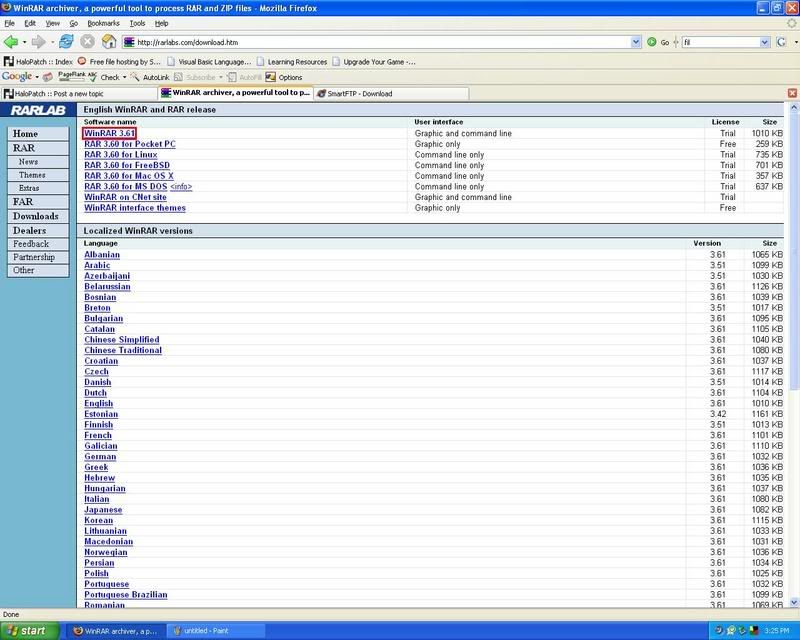
Tool to open Zipped Folders:
WinRar
(Select the one in the red.)
*Picture*
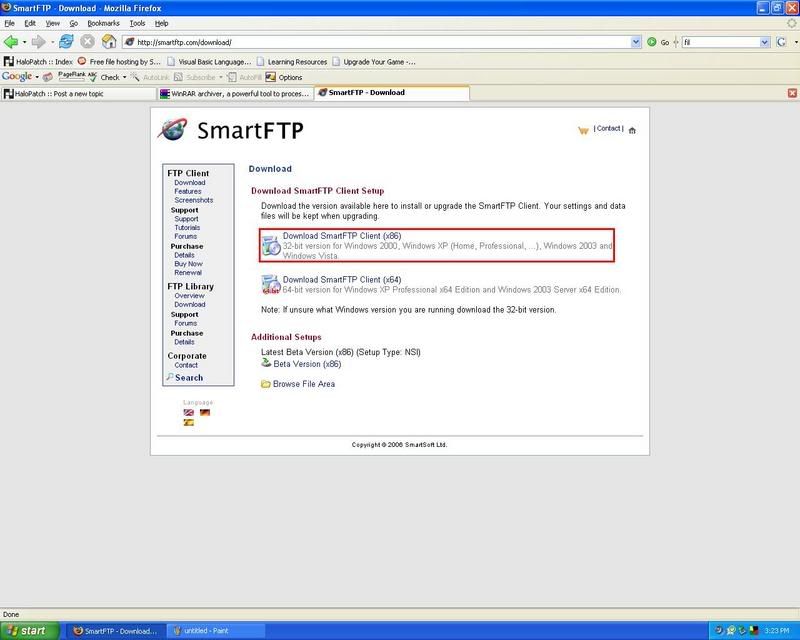
Tool to FTP:
SmartFTP
(I recommend the one highlighted in red.)
*Picture*
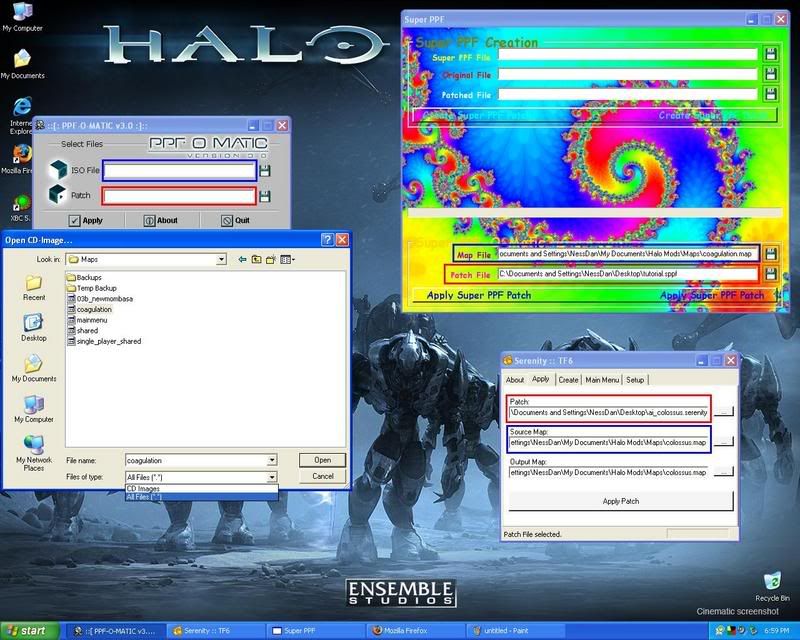
PPF Patchers:
SPPF, Serentiy, PPF-O-MATIC.
(To open these, you must have downloaded WinRar and have it installed.)
Websites to download a Halo 2 Mod:
HaloPatch, Halo Mods.
Burning Halo 2 to the Hard Drive:
If your Xbox supports it...
Start up your Xbox with your softmod on.
Insert your Halo 2 Disk.
Go into System and select "Copy Game to Hard Drive"
This will may differ if you have an EvoX dashboard.
If your Xbox does not support "Copy Game to Hard Drive" then...
Start your Xbox with your softmod on.
Insert Halo 2 Disk.
Go into your File Explorer.
Go into your D:\ Drive.
You are now in your Halo 2 Disk.
Now, on the other side of the file explorer, it shows you all your drives, select that menu by pressing R or L.
Travel to your main drive (Drive with the most space.)
Make a new folder named "Games".
Go into your your "Games" folder and make a new folder called "Halo2".
Go back to the menu on the left.
Select all the files.
Now bring up the option menu (Start, White Button, Black Button, etc.)
Select "Copy" and then let it copy the game to your Hard Drive.
If you would like to free up some space...
Delete all the files in the "bink" folder.
Delete all the Single Player maps.
How to FTP:
To Set up FTP
Go to your System.
Select "Network"
Set Type to Static or DHCP (I recommend Static)
Set IP to 192.168.*.* (If you chose Static; Make sure it's in your Router's IP Range!)
Set Subnet Mask to 255.255.255.0
Set DNS 1+2 to either your DNS's or 0.0.0.0
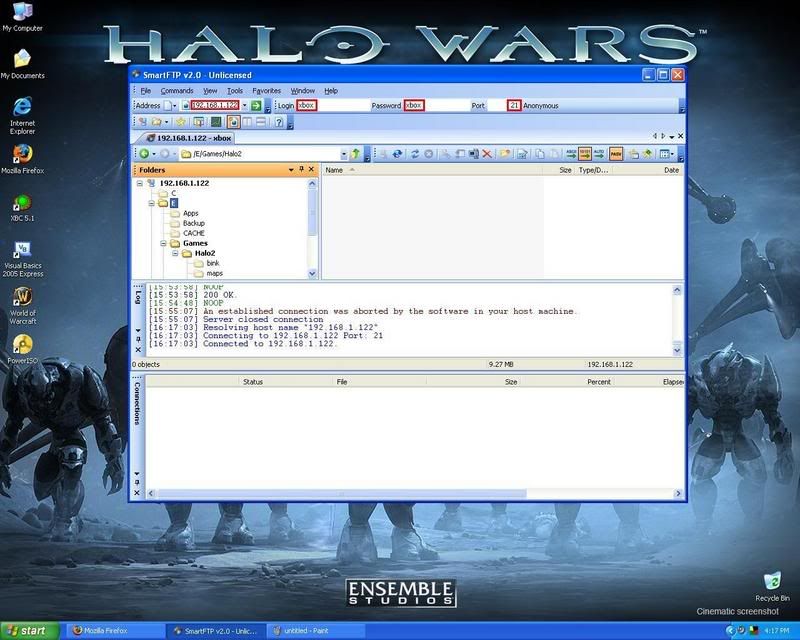
Turn on your Xbox, find out what you're IP is, and then open up SmartFTP on your computer, type in where it says address put the Xbox's IP. For Username and Password put Xbox. Set the port to 21.
Wait a second and it will connect and you will see the drives on your Xbox.
*Picture*
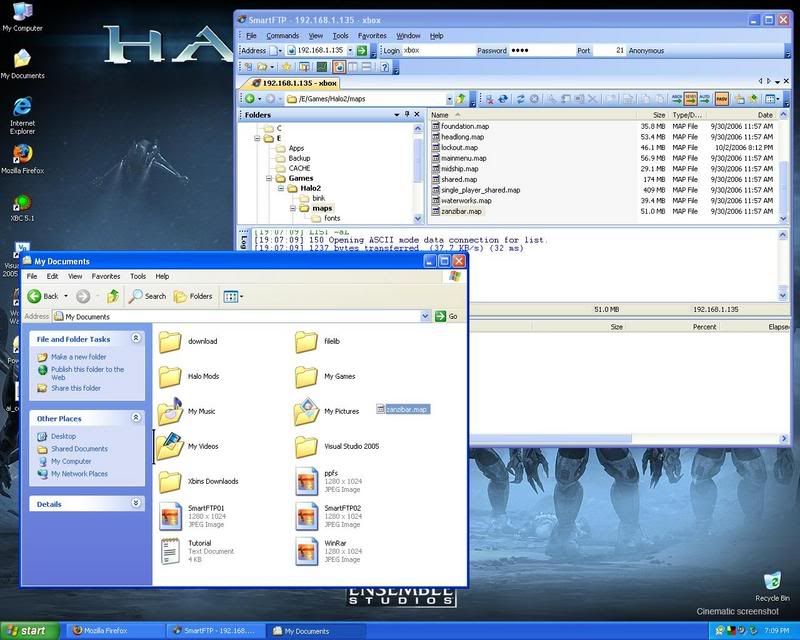
FTPing the map file.
Connect to your Xbox and go into your main Halo2 folder and take out the map you want, then drag it to a folder of your choice and let go.
*Picture*
Then your done, that maps on your computer.
How to Download and Apply Patches.
Now, let's try applying these patches,
.sppf
.serenity
.ppf
With their program.
SuperPPF
Serenity
PPF-O-MATIC
The blue square specifies where to put the map file and the red one specifies where to put the patch path.
*Picture*
(When using PPF-O-MATIC, make sure you select "All Files" so that it will show you .map's.)
After applying the patch to the patch...
Play the map by...
FTP to your Xbox.
Drag the map file to your maps folder.
When it asks if you want to overwrite select "Yes"
After it's done writing go to your "Games" and then click on Halo 2.
If you don't have "Games" listed on your menu then...
Go to your File Explorer
Go to: "(Drive that Halo 2 is in.):\Games\Halo2\default.xbe"
You're done,
now have fun with what you've learned and enjoy the great mods people are making all over the world.Something so big...
it will make gamers... do... something...
I'm making something so incredibly amazing, that it can't even be put on my blog...
Something so amazing, that it will have a guide on how to do it...
Something so amazing, that it will have you saying, "I'm thinking h4x."
Something so amazing, that the suspense will kill you... in 6 days...
I'll post up a blog about it once it's complete, but for now, I leave you with this word.
Local.
I'm making something so incredibly amazing, that it can't even be put on my blog...
Something so amazing, that it will have a guide on how to do it...
Something so amazing, that it will have you saying, "I'm thinking h4x."
Something so amazing, that the suspense will kill you... in 6 days...
I'll post up a blog about it once it's complete, but for now, I leave you with this word.
Local.
Tuesday, January 15, 2008
Birthday Bliss
Today was my birthday!
It was just amazing how I felt when my friend Samantha came to lunch and brought with her a cake, chips, 7-up, and a card that was Halo-themed. It was honestly one of the nicest things anyone has done for me out of their own will!
(Thanks Samantha!!!)
Today, I can't tell you how many messages I got on MySpace, XBox Live, and on my Cellphone wishing me a happy birthday, it was just great =D!
Thanks everybody! I'm 16 and I'm in love!!! With Jesus, of course.
Here are some pictures of my card =D!
Front of the Card
Inside of the Card
Behind the RvB Cover
Hoorah! It was mass pwnage.
It was just amazing how I felt when my friend Samantha came to lunch and brought with her a cake, chips, 7-up, and a card that was Halo-themed. It was honestly one of the nicest things anyone has done for me out of their own will!
(Thanks Samantha!!!)
Today, I can't tell you how many messages I got on MySpace, XBox Live, and on my Cellphone wishing me a happy birthday, it was just great =D!
Thanks everybody! I'm 16 and I'm in love!!! With Jesus, of course.
Here are some pictures of my card =D!
Front of the Card
Inside of the Card
Behind the RvB Cover
Hoorah! It was mass pwnage.
Sunday, January 13, 2008
Using a Zune as a Wireless Ethernet Bridge(?)
Ok, I just had this crazy idea.
Well, today I was Googling on how to make my Xbox a Web Server. Didn't find anything, but I really didn't try as hard I could have =P.
At the time, I was searching over my friends house, they had just bought a 360 and couldn't hook it up. So I told them they could hook it up wirelessly using a Wireless Ethernet Bridge, so we looked online and we found this little piece of technology created my M$!

The Xbox 360 Wireless Networking Adapter. It runs around for $100.00...
Now, the funny thing is, the exact same type of item (a Wireless Ethernet Bridge) costs only a fraction of the price, $50! So they charge more for something you could buy two of. Not a good move...
The only thing was, they needed something cheaper, so I got online and I actually found out that most wireless routers not only act as a Wireless Access Point, but also as a Wireless Ethernet Bridge! Here's a screenshot of me in my routers hacked firmware, it shows what my router can basically do wirelessly.

So I went online and looked for the cheapest Wireless G Router capable of being an ethernet bridge. I got around the $30's, but it'd still be cheaper to buy a cord...
Although my journey of finding a Router capable of becoming an Ethernet Bridge stopped there, I started thinking, how many other wireless devices have a dual-capability. What if my Zune could be used as a Wireless Bridge! How cool would that be to have you Media Player charging while using it to play online!!!
I think it's a very high possibility it's capable, but with the current firmware, it's impossible. Until someone finds out how to hack it, we'll just have to wait and see whether or not this fantasy is a reality!
Well, today I was Googling on how to make my Xbox a Web Server. Didn't find anything, but I really didn't try as hard I could have =P.
At the time, I was searching over my friends house, they had just bought a 360 and couldn't hook it up. So I told them they could hook it up wirelessly using a Wireless Ethernet Bridge, so we looked online and we found this little piece of technology created my M$!
The Xbox 360 Wireless Networking Adapter. It runs around for $100.00...
Now, the funny thing is, the exact same type of item (a Wireless Ethernet Bridge) costs only a fraction of the price, $50! So they charge more for something you could buy two of. Not a good move...
The only thing was, they needed something cheaper, so I got online and I actually found out that most wireless routers not only act as a Wireless Access Point, but also as a Wireless Ethernet Bridge! Here's a screenshot of me in my routers hacked firmware, it shows what my router can basically do wirelessly.
So I went online and looked for the cheapest Wireless G Router capable of being an ethernet bridge. I got around the $30's, but it'd still be cheaper to buy a cord...
Although my journey of finding a Router capable of becoming an Ethernet Bridge stopped there, I started thinking, how many other wireless devices have a dual-capability. What if my Zune could be used as a Wireless Bridge! How cool would that be to have you Media Player charging while using it to play online!!!
I think it's a very high possibility it's capable, but with the current firmware, it's impossible. Until someone finds out how to hack it, we'll just have to wait and see whether or not this fantasy is a reality!
Subscribe to:
Posts (Atom)